Potluck Planner
Know who's bringing what, with a food list your helpers fill in together.
PlanningInSync gives your potluck a shared food list. Your helpers add dishes and put their names on them, and everyone sees what's covered as it happens. Guests RSVP from a link in any browser, so you know how many adults, children and infants to feed.
How to plan a potluck with PlanningInSync
From invitations to a food list where every dish has a name next to it.
- Create the potluck. Set the date, the time food is served and the location.
- Invite guests with a link. They RSVP in their browser and tell you how many adults, children and infants are coming, plus any dietary needs.
- Bring in helpers. Invite co-hosts directly, or approve guests who tap Request Helper Access in the app.
- Fill the food list together. Helpers add dishes by category and assign them to themselves. You can also assign a dish to any guest by name.
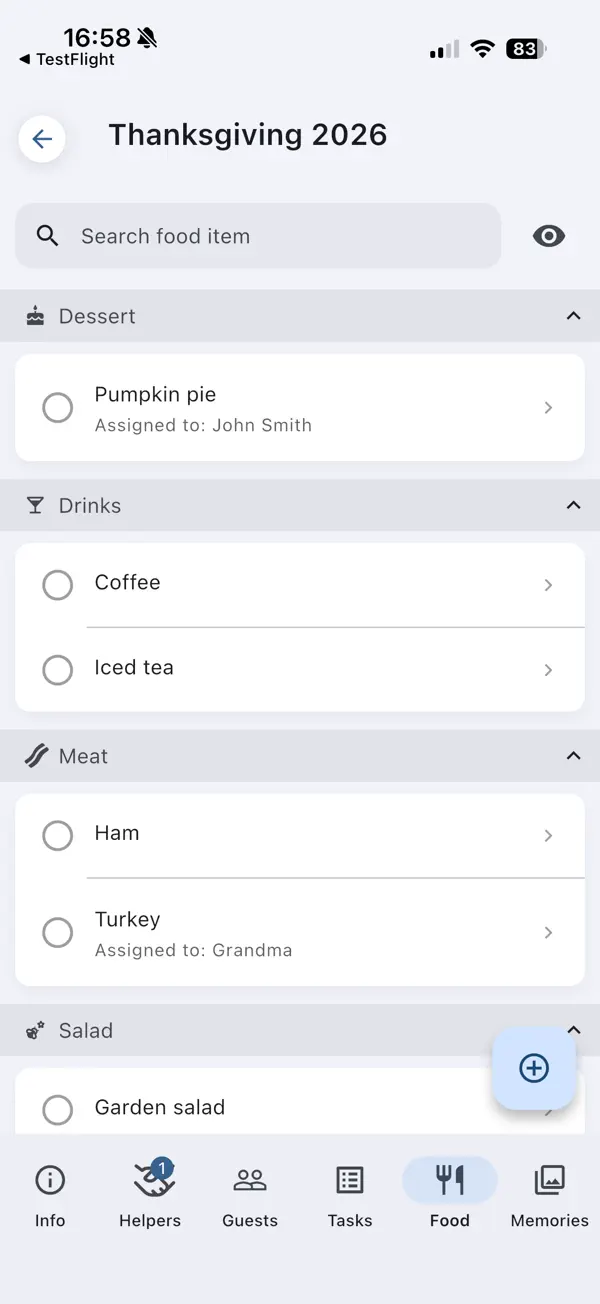
A food list everyone can see
Group dishes into categories such as meat, sides, salads, vegetarian, drinks and desserts. Each dish shows who is bringing it, so gaps and duplicates are obvious long before the day.
- Assign each dish to a helper, or type in any guest's name
- Mark dishes as done when they're confirmed
- Changes sync to every helper in real time
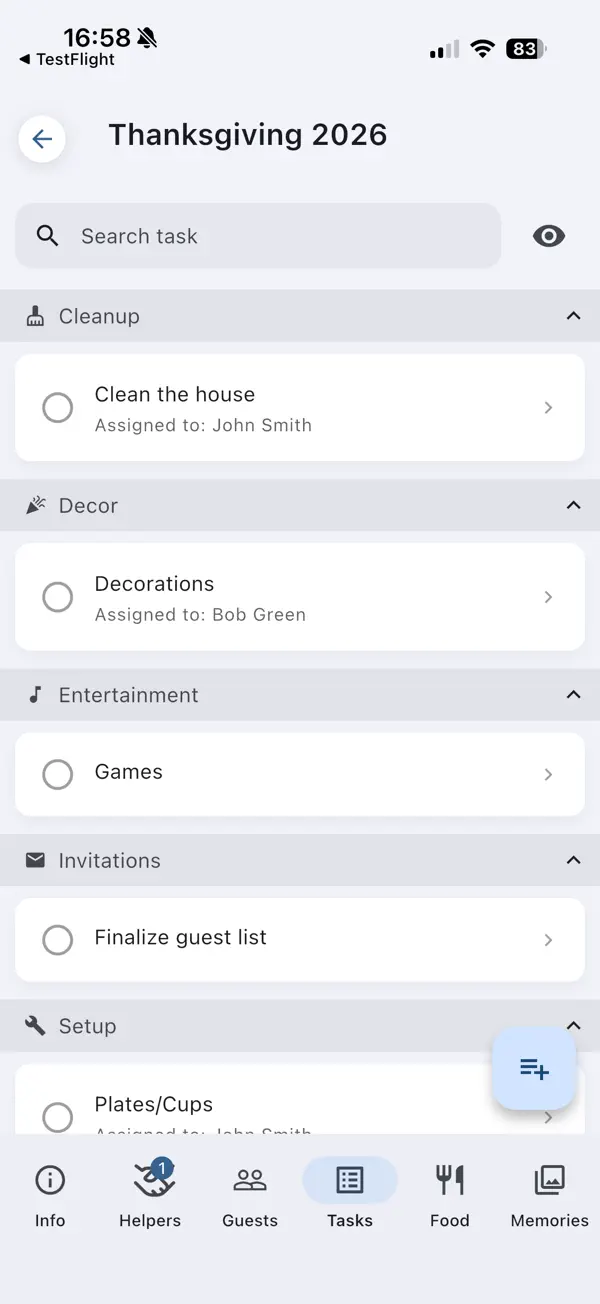
The rest of the work, shared too
A potluck needs more than food: tables, plates and cups, decorations and cleanup. Put those on a shared task list and let helpers claim what they'll handle.
Track the budget against what you actually spent, so supplies don't quietly add up.
Potluck planning at a glance
What PlanningInSync covers for a potluck.
| Who's bringing what | Shared food list with a name on each dish |
|---|---|
| Dish categories | Meat, sides, salads, vegetarian, vegan, gluten-free, drinks, desserts and more |
| Headcount | Adults, children and infants from each RSVP |
| Dietary needs | Guests add notes when they RSVP |
| Guest RSVP | Personal link, any browser, no app or account |
| Helpers | Invite them, or approve guests who volunteer in the app |
| Setup and cleanup | Shared task list that helpers claim |
| Budget | Planned budget vs. actual spending |
| After the meal | Shared photo and video gallery for your helpers |
Potluck planning questions
How do I keep track of who is bringing what to a potluck?
Add each dish to the event's food list and assign it to the person bringing it. Assign it to one of your helpers, or type in any guest's name. Everyone on your planning team sees the list update in real time, so it's easy to spot what's still missing.
Can guests sign up to bring a dish?
Yes, by becoming a helper. A guest taps Request Helper Access on the event in the app, and once you approve, they can add dishes and put their name on them. Guests who don't want the app can tell you in their RSVP notes, and you add their dish for them.
Do guests need the app to RSVP to the potluck?
No. Guests RSVP from a personal link in any browser, without an app or an account. The app is only needed for guests who want to join as helpers.
How do I avoid ending up with too many desserts?
Sort the food list into categories such as meat, sides, salads, vegetarian, drinks and desserts. Each category shows its dishes and who is bringing them, so gaps and duplicates stand out before the day.
Is PlanningInSync free for a potluck?
Creating the event, inviting guests and collecting RSVPs is free. Assigning dishes to people and planning with helpers uses a Shared Event. Every new account includes 2 shared events, and paid plans let you share more.
More answers in our Help & FAQ.
Plan your next potluck together
Set up the event, send the RSVP links and let your helpers fill in the food list.